Mental Health Guidebook
This guide extends our cognitive framework into mental health and how to respect it in product experiences.
Introduction
One of Microsoft’s top priorities is to develop inclusive, accessible technology. We’ve already shared some of our learnings through the Inclusive Design 101 toolkit and the Inclusive Design for Cognition guidebook This guide extends our cognitive framework into mental health and how to respect it in product experiences.
We’ve tested the approach in the development of a small set of products, and captured our top learnings as a set of design considerations. While there is work to do before these methods become commonly accepted best practice, we’re confident that in sharing them broadly we can collectively work toward a future where inclusion and mental health are at the forefront of innovation.
- Microsoft Inclusive Design Team
Why design for mental health?
Every situation we encounter requires us to tap into our abilities, motivations, and emotions. Mental health is in constant flux for all of us and impacts our cognitive abilities. Our mental health at any given moment changes the level of challenge we face in solving the task at hand.
- If we are experiencing stress, a task may feel impossible at the moment, but it is doable once the stress has passed.
- A negative experience with a product can activate an emotional response that reduces cognitive capacity.
By being mindful of how emotional state and mental health factors shape our experiences, we can prioritize mental health and reduce experiences of exclusion.
When we fail to help people feel successful and in control, they frequently blame themselves. This emotional state can reduce motivation, focus, and interest in continuing with the experience. Recognizing the fluidity of human experience allows us to build products and features that reduce cognitive demands, build agency, and enable success even as a person’s mental health needs shift.

One interactive experience that was designed with the holistic human experience in mind is the customization of notification settings. Unregulated disruption from notifications can be detrimental to cognition and mental health. Using the inclusive design methodology to understand how different people experience interruptions and how that experience varies with their emotional state, Microsoft created notification settings that support various people and situations. For example:


By surfacing the means of controlling disruption on the notifications themselves, we reduce the cognitive demands required and adjust their preferences in settings.
Our approach
In designing explicitly for the breadth of human experience, we support people in accomplishing their tasks as they manage permanent, temporary, or situational mental health challenges.
To design for the ebb and flow of our cognitive capacities in learning, focus, decision-making, communication, and memory, we have drawn on methodology from the Microsoft Inclusive Design for Cognition toolkit
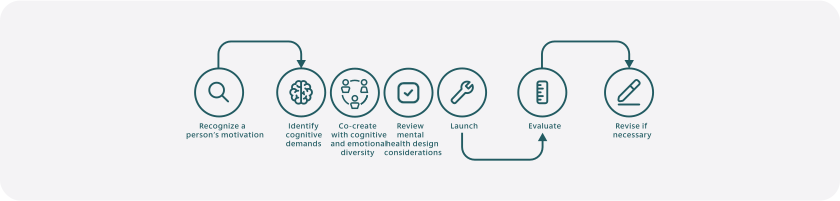
Motivation and cognition are both heavily influenced by fluctuations in our mental health and emotional state. People fail when when there is a mismatch between their level of motivation and the cognitive and emotional demands the task requires. When approaching a design problem with mental health in mind, we recommend that designers begin by developing an understanding of those mismatches using the Inclusive Design for Cognition methodology with a mental health perspective.
1. Start with motivation
- Identify motivations - such as expressing creativity or the desire to learn, grow, and succeed - and allow those motivations to drive the experiences we create. This will create a more cohesive and usable product than starting with technology and trying to retrofit it to an individual’s goals.
- Consider how emotional and mental health factors can affect motivation and how designs can support a person's varying needs.
2. Identify cognitive demands
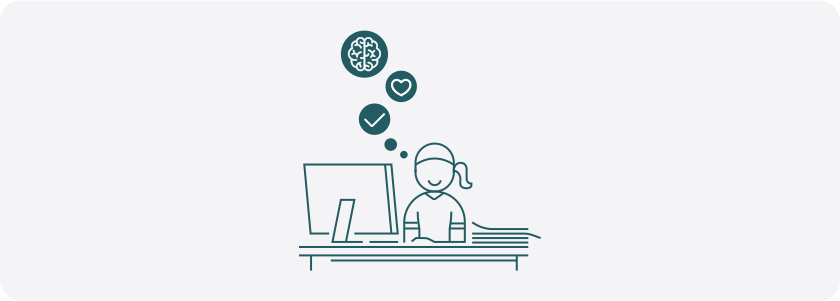
- Every task requires cognitive effort and emotional investment. By understanding where our products need learning, focus, decision-making, recall, and communication, we can help people maintain motivation, memory, and control.
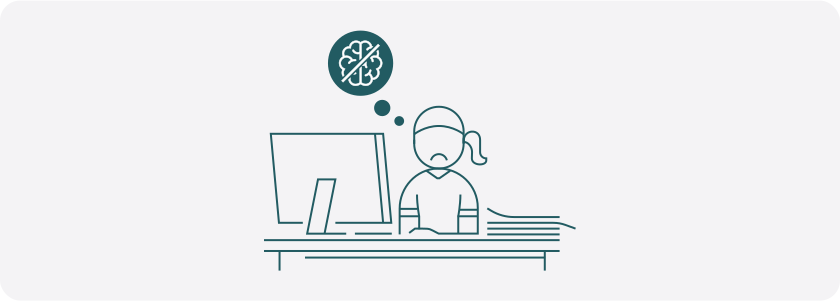
- Recognize how one’s cognitive capacity is impacted by their emotional experience. While a task may have the same cognitive demands from one day to another, mental health and emotional factors can significantly impact the effort required to meet those demands. Providing support, flexibility, and reassurance can turn technology from a nemesis to an ally.
3. Co-create with cognitive and emotional diversity in mind
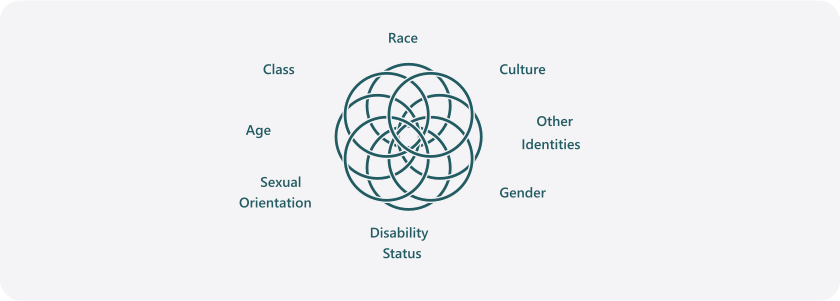
Co-creation brings people across the mental health spectrum and range of cognitive abilities into the design process. To ensure that your research and ideation reflect the breadth of human experience, be intentional about screening for and selecting collaborators with various intersectional identities.
As Kimberlé Crenshaw theorized during the study of intersectionality, every individual holds a combination of self-identities that overlap and interact with one another to inform their lived experience. Disability and mental health are understood and experienced in innumerable ways by different populations.
Design Considerations
Thoughtful co-creation produces ideas and features that would have been impossible without the collaboration of people with diverse mental health and cognitive experiences. To accompany, not replace, co-creation sessions, we've compiled the most common stressors reported in the co-creation sessions and organized them into a set of design considerations for mental health: Preserve, Direct, and Customize. For guidance specific to certain design elements, please review the Mental Health and Cognition Figma plug-in and design cards we’ve created to help design, advocate for and apply an inclusive design framework.
Preserve
Preserve focus, attention, and control.
- Ensure notifications are controllable, actionable, succinct, and relevant to the task and the moment.
- Celebrate small wins! Helping people feel good about themselves and the product helps maintain motivation. Reinforce control with clear navigation, minimal interruptions, and reduced complexity.
- Build trust with clear, transparent privacy settings that make it simple to control what information is shared with software and what the software, in turn, shares with others.
Direct
Help people maintain momentum with clear, accessible, logical flows.
- Track progress and make next steps easy to identify and complete.
- Surface settings within the flow.
- Support decision-making with clear choices and information.
- Provide predictable ways for people to find additional support.
- Help people find what they need in places where data accumulates by building ways to filter, sort, and search.
Customize
Design options for people to adapt the experience to their needs and preferences.
- Allow people to retain preferences across sessions.
- Provide filtering options for incoming information.
- Provide options for readability and appearance.
- Introduce new features contextually.
- Ensure customization options are in predictable and contextual locations.
Evaluation
A design isn’t inclusive without commitment to evaluation and iteration post-launch. Teams can avoid pitfalls by establishing human-centered success metrics in advance. Over-reliance on engagement numbers can encourage design patterns that are distracting. High usage is a common goal for a product, but it’s an unlikely goal for individuals. People typically prefer something that can help them accomplish their goals quickly and efficiently. Inclusive success metrics account for how the product supports cognitive diversity and makes them feel. Try asking some of the following questions to inform updates and adjustments:
- Are individual's goals understood and facilitated by the design?
- Does a person’s goals drive engagement? How does a person feel when using this product or feature? How do they want to feel?
- What support does the design incorporate to reduce cognitive demands?
- What positive emotions does the product produce? How can we increase those moments of delight?
- Are the design features flexible enough to accommodate shifts in individual's needs?
- Does the product seek feedback on people's functional and emotional experience?
- Are you iterating by integrating real human feedback and closing the feedback loop?
Take action
This approach is meant to work within, not replace, existing product creation processes. By mobilizing inclusive design, we can create products that truly set people up for success and unlock a new era of human potential.
We will put our own guidance into practice by seeking feedback and iterating on this guidebook as we learn more from design and mental health communities. Please reach out to inclusivedesign@microsoft.com for feedback and questions.
Case studies
Microsoft Copilot in Outlook
Scenario
Outlook is a familiar work tool that people use to schedule their workday, triage priorities, communicate, and collaborate. Many of us could not do our jobs without it! However, the sheer volume of emails can be overwhelming, and the constant influx of information can become exhausting. Reliance on a tool that triggers overwhelm can exacerbate mental health challenges, particularly in predisposed people. One person with a mental health condition mentioned that it feels like he is always fighting in Outlook.
Getting lost in a long email thread, struggling to prioritize and initiate tasks, or lacking the confidence to draft an important email can foster negative emotions about oneself, which can impact cognition, productivity, and our ability to achieve more.
Key insight
Designers can leverage the power of AI to reduce the cognitive demands needed to keep up with work tasks and decrease anxiety. Because email is such a significant part of our daily lives, facilitating success in Outlook has immense potential for preserving motivation by making people feel confident, capable, and productive. As someone's confidence boosts, it could improve their business impact and mental health.
Solution and impact
Outlook designers paired generative AI developments with the inclusive design for mental health methodology to guide design choices and create solutions that support mental health. The team provided early access to Copilot in Outlook to people with mental health conditions to assess the product and co-create improvements. Copilot in Outlook consists of three experiences: Summary by Copilot, Draft with Copilot, and Coach by Copilot.
Summary by Copilot allows people to summarize an email thread, making emails more digestible by breaking complex information into key points and helping people refresh their memory quickly. With interactive citations, people can easily fact-check, reducing self-doubt.
Draft with Copilot can generate email drafts, helping people overcome task paralysis. People can either generate a custom draft or see suggested replies for a particular email thread, which helps them feel unblocked in their everyday workflow. To mitigate anxiety about how they may be perceived when drafting with Copilot, this feature includes options to adjust the tone, sentiment, and clarity of the email. One of the tone options is “Sounds Like Me”, which models the email draft after the person's usual writing style. Based on co-creator feedback, the Outlook team is now investigating how to provide additional guidance about what inclusive considerations Copilot is making when drafting emails and about how to write better custom prompts.
Coach by Copilot helps people improve their own email drafts by providing customized feedback. People appreciated that instead of completing work for them, the tool guides and educates, building their confidence. However, people wanted the tool to go one step further and help them integrate the feedback provided. For that reason, the Outlook team is now working on adding a simple “Rewrite” button that will allow people to get an updated version of the email with the coaching feedback incorporated.
Co-creators with mental health conditions confirmed that Copilot helped manage the cognitive demands on memory and communication, helping them feel confident in their abilities and reducing cognitive overload. By facilitating action, Copilot in Outlook proved to reduce overwhelm and prevent burnout. In experiencing success, people experience more motivation and positive emotions, making the impact of this inclusive design exponential.
Viva Pulse
Scenario
Viva is an employee experience platform within Microsoft 365 and Teams that brings communication, feedback, analytics, goals, and learning into the workflow. Pulse, an app in the Viva suite, empowers managers to get quick, actionable feedback using brief team and project-based surveys. It enables team leads and managers to request ad-hoc feedback on daily topics to understand their team’s needs better and address them at the moment.
Key insight
Managers and team leads often juggle multiple tasks. To inform their team priorities and strategic decision-making, good leaders strive to understand employee sentiment and address concerns. Managing a workload, particularly when balancing multiple projects, requires that we engage in recall, focus, communication, and decision-making. Leaders may need help to define what questions to ask, understand survey results, or identify solutions. The effort required to assess needs and address concerns can overwhelm leaders and their teams. For people who struggle with mental health, this can create a cycle of negative self-talk, procrastination, and frustration that erodes psychological safety for the whole team.
Solution and impact
The team worked to reduce the cognitive demands of learning in survey creation, decision-making, and reporting. To support the focus and mental health of survey authors and recipients, the team applied design considerations for mental health when creating the UX of the surveys. Below are some examples:
- To spark easier task initiation, the manager is prompted with a pop-up that explains the benefits of Pulse and provides clear next steps.
- Managers are provided with a collection of survey templates that can serve their team’s unique needs.
- By providing managers with established science-backed questions, we take the guesswork out of learning and understanding their teams’ needs and and help them feel confident in taking action.
- Customization is enabled through filter and search to choose the right questions from a pre-written library, and the ability to truly customize through editing. Leaders can edit the questions or input their own to build a truly customized survey for their team.
- Guiding managers through a creation wizard helps them celebrate incremental progress and succeed in task completion. A person can track their progress through the wizard in a visual at the top of the page. Navigation is clear and consistent, providing direct access to the next steps, back, undo, and save actions, helping people move at their own pace and feel in control.
- Text elements are broken into manageable chunks and organized with headers and visual containers making it scannable. Learning new things requires energy, so designers focus on crafting clear content that moves a person toward their goal. Learning opportunities and tips to write effective questions are highlighted, and modals with deeper explanations can be explored as needed.
- While moving through the form, the result of each action is confirmed, helping people internalize accomplishments, and build positive feelings for the system and themselves.
Generating and sharing reports with the team can lead to collective data-driven decision-making. This can improve the mental health, success, and productivity of both employees and managers. With anonymous results, survey recipients can speak openly with psychological safety and provide authentic feedback that leads to positive change in their environment, trust, happiness, and belonging.
Acknowledgements
We want to thank the many people who contributed to this guidebook. By design it’s a living collection of ideas and practices. It reflects a community of people across Microsoft and beyond. We would like to give special thanks to Mental Health America for their guidance. This guide was created by Ali Benter, Christina Mallon, Ebele Okoli, Tany Holzworth, Will Brennan, Alice Lee, Kelly Gorr, Amanda Poh, Amanda Yang, Ben Truelove, Karina Dion, JuliaSheth, Tasha Lutfi, Anton Andrews, Skye Pazuchanics, Justin Sepulveda, Kristen Sunny, Andrew Wu, Hernan Maestre, David Snow, Clint Covington, Christa Keizer, Jenny Lay Flurrie, and Microsoft Mental Health and Neurodiversity Employee Resource Groups. Our inclusion efforts are built on the work of Microsoft’s founding inclusive design team, Megan Lawrence, Jennifer Zhang, and the mental health activists who came before us.