Cognition Guide
Learn how you can build products that account for the amazing diversity of human cognition.

Introduction
Microsoft launched the Inclusive Design Toolkit in 2015, a set of guidelines for building products that help people of all abilities realize their full potential. This toolkit is based on three principles:
- Recognize exclusion
- Learn from diversity
- Solve for one, extend to many
The principles state that exclusion will happen unless product creators learn from people with disabilities, apply insights to product creation, and extend benefits across a broad range of people.
Millions around the world downloaded and used the toolkit, but there were whole fields of opportunity the toolkit didn’t address. This addition is a first step in addressing cognitive exclusion, which occurs when products don’t account for the different ways people perceive and understand the world around us.
“Cognition refers to a range of mental processes that acquire, store, manipulate, and retrieve information.”
— Cambridge Cognition
Cognitive Exclusion
We approach any situation with a combination of our capabilities, motivations, emotions, and environmental demands. Those factors can help us succeed, or they can work against us.
As an example, if someone’s ability to complete a task requires sustained concentration and minimal distraction, they’ll struggle to do so in a noisy, active environment. In that situation, the obstacles are too much for motivation to overcome.
For any task to be successful, motivation must equal or surpass cognitive load
This formula comes from the late Dr. Bruce Baker, and it’s one of our guiding ideas. It’s critical to identify the cognitive load, or the type and level of thinking required to successfully complete a task. Once the load is clear and defined, we can work to ensure it doesn’t overwhelm a user’s motivation. We can work against cognitive exclusion with some key questions:
- What kind and what level of cognitive demands do our experiences place on our users?
- Are there some types of cognitive demands that are especially heavy, and if so do we support different needs around capabilities like focus and attention?
- Do we support many ways for people to be at their best, or just the ones that mirror our own needs?
Why we fail
The fight against cognitive exclusion is full of pitfalls, which despite good intentions, result from poor understanding of science or broad assumptions about people with certain medical conditions. This guide helps us avoid many of those pitfalls by directing us away from the impulse to become experts on medical conditions. Instead, we focus on understanding cognitive needs, and deter, mining whether the experiences we create serve them.
While addressing cognition in this way has huge potential for innovation in every industry, the approach can have impact that goes beyond innovation and business value.
It’s a critical step in moving beyond an era of technology that forced people to adapt to products—and toward a future where technology adapts to people.
Why it matters
Designing for cognitive diversity is the foundation for the future of work, regardless of industry. As technology expands, we must consider what it means to create experiences that adapt to people and context, and create along the emotional and functional spectrum. Every experience we create should behave appropriately, and in service to the people who interact with it. To do this effectively –while also fostering creativity, innovation, and competitive advantage – we must consider cognition and start with human needs – not technological capabilities.
Many experience creators are likely thinking about the untold possibilities for a new era of generative AI. There are certainly opportunities for AI to reduce exclusion, but AI can actually perpetuate and amplify bias. The way to ensure AI is used in service of people is to start with human motivations and a commitment to work against bias.
Framing cognition
People with the same diagnosis, like ADHD, may have very different needs for behaviors like focus and concentration. On the other hand, many different diagnoses share similar needs. Product creators shouldn’t attempt to diagnose medical conditions, unless they’re working directly with healthcare experts.
Instead of problem statements and hypotheses like helping folks with ADHD, we should start by identifying the motivation – to build community, for example, then the cognitive demands of fulfilling that motivation.
Practice purposeful behavior design
In this body of work, human-to-human interactions are models for designing human-to-technology interactions. It’s not about making technology more human-like. It’s about designing technology to embrace the things that make us human.
Inclusive Design Cognitive Exclusion Guidelines
1. Start with motivation
To address cognitive exclusion, we start with human motivations like creating, playing, or growing, instead of asking what features or technology we can add to a product. Once we pick that motivation, we can start looking for mismatches that prevent someone from achieving it. In this context, mismatches arise from the degree of cognitive demands that our experiences ask of the user.
Aligning motivations, goals, and tasks
Product creators often ignore core human motivations and invent tasks that serve the product, not the people using it. Instead, we should make it simple to set goals and accomplish tasks that fulfill motivations.
We want to avoid a collection of disconnected features with no mapping between tasks, goals, and motivations. When all the components in a product support the same set of higher-level goals and motivations, the entire experience feels coherent and in service to your needs. When they aren’t aligned, tasks can seem like pointless distractions from true motivations.
If you want to create a deeply immersive, inspirational experience in a video game, you first need to learn to code. If the task of learning is solely focused on technical aspects of coding, you may get extremely discouraged. Imagine how different it would be if every learning step reinforced your desire to build new worlds.

Human motivation
Creation – feeling inspiration, curiosity, joy, discovery, wonder
Goal
Making a video game
Task
Learning to code2. Identify cognitive demands
If the motivation, goal, and task are all aligned, we need to ask what cognitive demands are being asked of the user. Every experience requires some amount of cognitive effort. But to ensure we’re setting different kinds of users up for success, we need to understand the kind of cognitive effort required.
There may be more than one type of cognitive load that’s relevant for any experience. It’s up to you to decide what kind and how much they stand in the way of motivations, goals, and tasks.
Types of cognitive demands
Zeroing in on cognitive demands is the result of our explorations in cognitive science, psychology, and philosophy. We analyzed secondary research and spoke with nearly a hundred experts to understand how to best approach this complex space. We also spoke to and conducted our own research with hundreds of people with cognitive disabilities around the world.
We’re beginning with some targeted areas, based on scientific definitions of different types, of cognition. But there are many more dimensions of cognition than what we’re presenting here. We’re hoping for an industry-wide dialogue that helps us evolve and improve this toolkit over time.
 Learning
 Focus
Focus Decision-making
 Recall
 Communication
Learn
Everyone approaches learning differently depending on their motivation and goal. Because technology is often designed for people who learn with confidence through trial and error, some product designs exclude those who need additional guidance or support.
A person learning to create a game or write a line of code may need different kinds of guidance in each step of the learning journey. Consider how many times a person needs to switch tasks to and from help content. Consider what assumptions are made by experts in a product about what is known when someone new is learning. Consider how technology can support and enrich learning moments and what role it plays in facilitating a good experience.
How would you approach cooking a new dish?
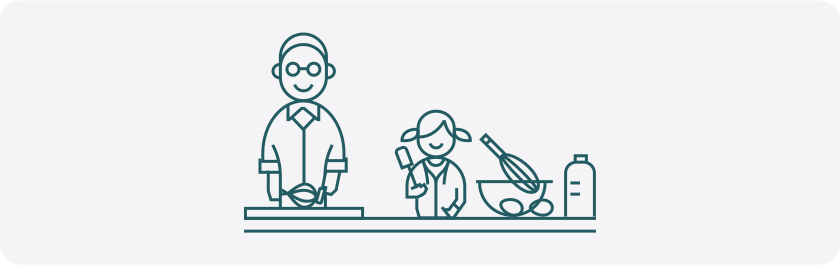

Trial and error
(Tinkering)
Follow a recipe
(Self-guided)
Taking a class
(Structured learning)Focus
People’s wellbeing is often impacted by the amount of information they’re inundated with when using technology. Much of our daily life requires that we select and perform tasks (sometimes simultaneously or in quick succession). We rely on some level of attention management to make decisions about what comes next, but these interruptions and distractions all influence this process. We need to evaluate how we are helping and hurting our users and the influence we have on their states of mind.
People move between focused activity and states where they’re taking in information (discovery, immersion, etc.). What do people do to adjust between different levels of focus? What is the role of distractions and what methods do people use to filter them out?
Technology can help people tune in and tune out as is needed at that moment, responding to shifting demands. We can protect scarce attention and help people direct it to what matters most by thoughtfully designing for task switching, sustained attention, and more.
How would you approach focusing on a project?


Complete isolation
(Zero stimuli)
Soothing music
(Some stimuli)
Working at a cafe
(Multiple stimuli)Make decisions
How can technology understand and provide the information people need to make decisions? Do we seek one piece of information, or must we understand how everything connects and know that every single element is in harmony?
People have very different sets of considerations for decisions: stakes, consequences, risk, contextual information, and more.
Consider what your experience provides at every decision point. What information a person needs to decide, and where they get that information is important to explore along with a need for clarity on potential consequences (like data loss or performance). Consider how information gathering to make informed decisions varies and what content is needed to support people getting what they need to act.
How would you approach planning a trip?


Looking at airfare
(Needs single data point)
Get tickets, room, and car
(Multiple data points)
Detailed itinerary
(All data points on accord)Recall
Sometimes remembering how to do something or where an object is can be simple – especially if it’s important to us. In other situations, it’s helpful to have memory cues.
- Consider where and when people are expected to remember something. Are you assuming the user will remember a task perfectly after it’s only done once?
- Consider the flow of interactions from the moment a person intends to do something all the way to completion. Consider how people create their own systems for placing, remembering, finding what they need to achieve their goals.
- Consider what happens when someone is distracted and needs to remember what they’ve already done, and what they need to do next.
- Consider the complexity of interacting with a computing device and how many steps and sequences that people can tolerate, and the complexity added by poor feature discoverability and hidden UI.
Product creators have a responsibility to consider how and when people make automatic associations versus when they need reminders.
How do you remember where to put keys in a new home?

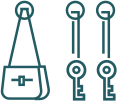
Some people always remember their keys
Creation – feeling inspiration, curiosity, joy, discovery, wonder
Some people use reminders to remember their keys
(Digital or physical)
Some people makes multiple copies of keys
Because they realized they might run into recall issuesCommunication
Language is only one way humans communicate. The way we move—including our body, eye, and facial cues—all create a constant flow of signals that indicate thoughts and feelings. We subconsciously adapt those cues to different contexts.
If we’re speaking with someone for the first time, it can be with a friendly but distant tone. If we’ve known someone for a while, the relationship can develop into something more intimate and responsive to different situations.
For example, a student may want their tutor to simply stand by while they solve a familiar type of problem. For an unfamiliar problem, they may want more proactive, frequent guidance. A good tutor will sense these different needs intuitively. Technology isn’t nearly as adept and will ignore those needs unless it’s deliberately built to address them.
A person who’s new to an experience may want real-time pop-ups or in-context tips, updates, or notifications. They may want information from past sessions to inform future sessions, but fewer tips over time. Some people may prefer more visual cues, while others may prefer written guidance. How does communication shift over time when technology gets to know our contexts and preferences better? Generative AI may give us extremely powerful ways to adapt to individual desires. But for AI or any other technological advancement to be truly useful, product creators need to understand the relationship and contexts between people and technology, so relevant experiences can effectively adapt to different needs around tone, frequency, and format of information.
**How would you communicate with a new teacher or tutor?


1st session, asks how they can help
Getting acquainted, start to build trust with sincerity and empathy
5th session; knows your needs and style
Adapts to your communication needs
10th session; knows your strengths and areas for growth
Provides support and ongoing value3. Co-create with cognitive diversity in mind
Careful observation and empathetic conversations with individuals and groups are key to understanding someone’s behavior.
Since our starting place is a motivation like focus, not a medical condition, we recruit people who identify focus as an area of concern, including folks with conditions like ADHD. They co-create solutions with us, alongside a range of people who don’t have ADHD, but also get frustrated with interruptions.
Our inclusive design for cognition screeners includes example questions used for recruit co-creaters:


Consider situational context
A person’s emotional state, personality traits and wellbeing can drastically affect cognitive areas and the degree of exclusion.
One person may be stressed and anxious for reasons unrelated to a task. They might feel the task is impossible in the moment, but entirely doable and even easy at a less stressful time. A person’s belief about their ability to perform impacts their persistence and level of effort. Like attitudes towards risk, our self-belief or efficacy is situational.
As we frame problems and recognize exclusion, we should also consider the contexts that shape a person’s experience.
Get inspired by human interactions
It’s always a choice to let either people or technology lead an interaction.
While there’s endless potential for how technology can augment, assist, and support people, we can’t forget the human needs of control, trust, and dignity. When we design technology, we are, in essence, teaching it how to behave appropriately as it interacts with people. To do this, we need to understand people. Just as humans get it wrong sometimes, so does technology.
Setting expectations and admitting mistakes are important principles for human-to-human and technology-to-human interactions.
Take action
These guidelines are meant to work within, not replace, existing product creation processes. We encourage you to use them with the accompanying worksheets and screeners to identify motivations, tasks, goals, cognitive demands and who might be excluded from experiences.
Look at how others have used the guidelines through case studies.
A call for a new class of experiences
In today’s tightening economic climate, business leaders will ask product teams to get more efficient and produce more measurable results. So how can you justify an increased investment in creating inclusively for cognitive diversity? The true business case lies in the fact that cognitive diversity includes everyone, from people with diagnosed medical conditions to those in temporary situations.
As our understanding of the range of human diversity and our technological capability grows, the most successful, market defining products will be those that can adapt to different human motivations and needs. This guide isn’t intended to create extra add-on processes with layers of work and expense.
It’s a new way forward that replaces our previous ways of creating for ourselves and the way we think. It’s a way to participate fully in an evolving ecology between people, their relationships, motivations, and tools. We are just beginning to uncover the possibilities, but even now we can see the enormous potential of adapting experiences to the incredible diversity of human cognition.
This is our call for a new class of experiences that honors cognitive diversity and unlocks a new era of human potential.
Acknowledgements
We wish to thank the many people who contributed to this guidebook. By design, it’s a living collection of ideas and practices. It reflects a wide community of people across Microsoft and beyond. We’d like to give a special thanks to our partners and contributors: Dr. Margaret Burnett, Jutta Treviranus, Amber Case, & Cathy Bodine. Thank you for your leadership in inclusive design and mindful design practices.
This was created by: Doug Kim, Margaret Price, Christina Mallon, Nathan Kile, Anna Cook, Keira Xu, Anna Tendera, Andres Pacheco, Tenille Lively, Catherine Ekonomou, Dona Sarkar, built on the work of the founding Inclusive Design Team and Inclusive Design activists that came before us.