Inclusive activity cards
The activity cards and support cards are built to be integrated into your process. Jump-start creative thinking and stress-test concepts through an inclusive lens.

Introduction
The activity cards are designed to support many different goals and outcomes. They're organized according to five phases of a design process – follow them as a linear, comprehensive guide or use them more freely to supplement your existing practices. Working in tandem with the Support cards, these serve as a great introduction to inclusive design.
Get oriented
Equip yourself with the information you need to get started. This stage introduces empathetic problem solving and research, and the basics of inclusive design.
Frame
Learn from different perspectives and apply them to the bigger picture. This stage informs your design thinking through the lens of human limitations and possibilities.
Ideate
This is a generative phase that results in first-round concepts. You’ll explore the mismatches that exist in various experiences, and formulate human-led, purposeful interactions from your discoveries.
Iterate
Here's where you'll build and test prototypes of your solution. You'll stress test your concepts from a micro-view and holistically, as you continuously brainstorm and refine.
Optimize
Take a step back to evolve your assumptions. Review your solution from every angle, and measure its success in terms of inclusive design and real-world feasibility.
Get Oriented | Computer Trust
Purpose: To unearth why humans trust and mistrust interactions with technology. Instructions
- Write on paper or a white board “I’d trust a computer to fill in blank, but I’d only trust a human to fill in blank..”
- Fill in the blanks as many times as possible in five minutes.
- Reflect and discuss.
- In the range of responses, what stands out? What are the forces that impact trust?
- How could technology behave better to positively impact trust?
 Materials
Note taking supplies Tips
Tips
Try a variety of interactions ranging from strictly transactional to pretty personal. Do this as a quick 5-minute exercise, or pace it for a more thoughtful role-play that could be re-enacted and discussed amongst the group.Frame | Create a Persona Spectrum
Purpose: To map human abilities on a spectrum to inform solutions that benefit everyone.Instructions
- Interview a person(s) with a permanent limit to at least one ability.
- Ask them about what they like to do and how they go about it.
- Note those situations in which they experience friction, or limited accessibility.
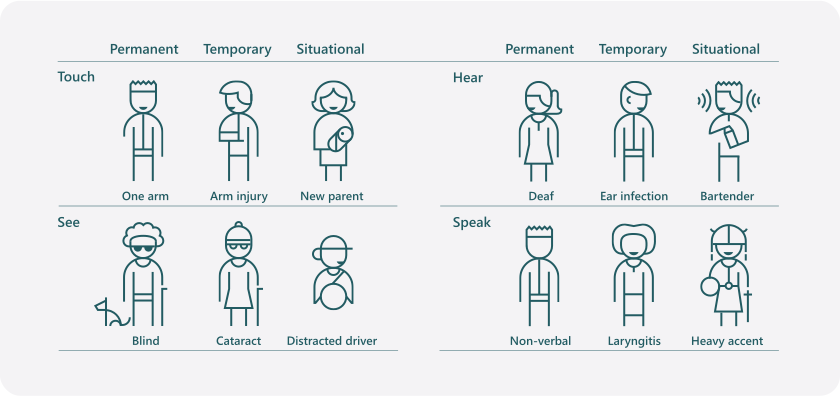
- Create a spectrum that illustrates how a similar limitation extends to temporary and situational scenarios.
Materials
The Persona Spectrum support cardTips
Create a Persona Spectrum Bear in mind that an accomplishment for this person can be a simple task, or a larger concern. This is a great introductory exercise to understand inclusive design broadly, and also acts as a good check-in exercise during a more granular design process.Frame | Persona Network
Purpose: To consider design challenges in terms of someone's personal ecosystem.Instructions
- With a particular person in mind, make note of who they interact with every day. Who do they rely on? Trust? Enjoy?
- Draw a map of the person and their key interactions with 3-5 people. Include the different types of interactions that typically take place, such as making plans for dinner or going to work.
- List the mismatches between the person and their environment.
Materials
The social context support card. Note taking supplies.Tips
There's no one “right” way to map the network. Do what makes sense for your creative process. Do this activity after learning about the challenges, enablement, successes, and motivations of a person(s) with a permanent disability.Frame | Interaction Diary
Purpose: To show how detailed observation of people interacting can stimulate and inspire inclusive design.Instructions
- Select a location where you can observe people interacting with each other. Ideally, a place where you can take notes, sketch and observe for an extended amount of time.
- Focus your attention on the little things, so that your awareness is heightened during your observations. Take notice of verbal and nonverbal interactions.
- Write or draw the interactions happening between humans and object. Repeat with humans and technology.
- Reflect on your observations to further explore mismatches of human-to-human and human-to-technology interactions.
Materials
Examples of Mismatch support cardTips
Pay attention to how people move through a space – their emotional cues and body language. Were their experiences negative or positive?Frame | Human Analogy
Purpose: To draw parallels between the role of human behavior and technology's behavior.Instructions
- Alone or in a group, brainstorm for 3-5 minutes to identify the human equivalent of the tech solution you're designing. Think of it in terms of jobs - is it an assistant? A teacher?
- Set up time to interview people who perform those roles. Take note of what makes them good at their work.
- Brainstorm ways to incorporate those insights into the design of your solution's behavior.
Materials
Note taking suppliesTips
Contrast two different job analogies to understand the nuances of the tasks involved. Consider pre-arranging for a group.Ideate | Mismatch to Solution
Purpose: To brainstorm opportunities for an improved product or experience, based on mismatched interactions.Instructions
- From your research, make a list of all the mismatched interactions that people experience.
- For each mismatched interaction listed, create a focused question about the opportunity to improve your product or service experience. For example:
- “How might we create…”
- “How might we improve…”
- “How might we enable…”
- Go through the list of opportunities and select the three you're most interested in exploring further.
Materials
Examples of Mismatch support card. Large paper and markers. Note taking supplies.Tips
Writing the opportunities in the format of a question will help during the brainstorming process to keep people focused. Going one by one down the list of mismatches can help prevent overwhelming participants.To generate design concepts based on inspiration from mismatched interactions.
Purpose: To generate design concepts based on inspiration from mismatched interactions.Instructions
- From the list you generated in Mismatch to Solution I, pick the three you’re most interested in.
- As individuals, use the first idea and brainstorm for 3-5 minutes to generate a list of possible solutions. Write the solutions on sticky notes. One idea per note.
- Repeat step #2 with your next two choices.
- If you're in a group, share your ideas and group them in clusters of like ideas. Or filter the ideas according to what you'd like to work on as a team.
Materials
Examples of Mismatch support card Sticky notes, pensTips
Place emphasis on generating a volume of ideas before clustering and filtering. Start the activity with a one-minute ice breaker that illustrates how much can be accomplished in a one-minute brainstorm session. Give participants a word like “jump” and ask them to write down their associations with the word.Ideate | Design a Microinteraction
Purpose: To articulate each small detail in a sequence of interactions in order to find ways to make the interactions more inclusive.Instructions
- From an existing design or prototype, choose a specific concept you want to improve.
- Compose a sequence of frames, or otherwise outline the following steps:
- Whether the sequence is user or system initiated.
- How the user interacts with the trigger.
- How the feedback begins.
- How the user interacts with the feedback.
- What happens immediately after the feedback is complete.
Materials
White board or large paper. Markers. Sticky notes.Tips
Introduce the activity by using the example of tying a shoe as a microinteraction. Ask people to write out the steps to tie a shoe. Then in pairs, have one person read the directions while the other person follows the steps. It'll shine a light on how precise you need to be about step-by-step details.Ideate | Evaluate Technology's Role
Purpose: To focus on technology's role in an interaction to sharpen, simplify, and prioritize your designs.Instructions
- Select your favorite design concepts or existing prototype.
- Using the Role of Technology support card as reference, identify and list the role technology is playing in your design.
- Evaluate each design and determine if the technology you've chosen is the simplest or most appropriate for the result you want to achieve.
Materials
Existing design concept or prototype. Examples of Mismatch support card. Role of Technology support card. Note taking supplies.Tips
Use this exercise to prioritize concepts before the Iterate stage. During the Iterate and Optimize stages, you can evaluate your solutions with this role to make sure they accomplish what you intended.Iterate | Low-Fidelity Prototype
Purpose: To refine solutions in a quick, iterative, low cost, user- focused manner.Instructions
- List the microinteractions in your design.
- Choose one interaction to prototype.
- Using materials at hand, build a low-fidelity prototype that does the following:
- Addresses each step of the interaction.
- Can communicate its own function without explanation.
- Test the prototype with users and observe for both delight and pain points.
Materials
Use paper, stickers, clay, recycled materials, recorded sounds, video—whatever materials you think will help you create a rough demonstration of how your solution will work.Tips
The value is observation of both the positive and the negative. People can role-play the technology with a pre-determined script.Iterate | Simulations
Purpose: To reveal opportunities for improving your solution by simulating temporary and situational limitations.Instructions
- Write the sequence of steps a user will take in your solution.
- From the Temporary/Situational Limit support card, choose one limitation.
- Recreate this limitation for yourself.
- Go through the sequence of steps you wrote in #1.
- Note what could be improved.
- Adjust your design.
- Repeat with other limitations from the Temporary/Situational Limit support card.
Materials
Temporary/Situational Limit support card. A prototype (low to high fidelity).Tips
Build your solution by creating low to medium fidelity prototypes. Examine and define what you want the interactive experience to be holistically and from a micro-view. Iteration takes into consideration the full Persona Spectrum and what's appropriate physically, contextually, environmentally, and socially for the person(s) involved.Optimize | Context and Capability Match
Purpose: To evaluate whether your concept can adapt to different contexts. When a person's environment changes, their capabilities could change.Instructions
- From the Physical or Social Context cards choose one context.
- From the Temporary/Situational Limitation card, choose one.
- How well will your solution adapt to that combination?
- List modifications you would make to adapt your solution.
- Revise your scenario to include how it responds.
- Repeat with other combinations.
Materials
Conditions support card. Social Context support card. Physical Context support card. Temporary/ Situational Limit support card.Tips
Allow plenty of time as this is an exercise that requires reflective thinking. This exercise is similar to the Situational Adaptation activity. If you’re short on time, choose one of the two.Optimize | Situational Adaptation
Purpose: To discover ways to adapt your solution to work for a variety of situational limitations.Instructions
- Using the support cards choose:
- One example of physical context
- One example of social context
- One example of time of day
- Take 3-5 minutes, think of the three contexts together and list as many situational limitations of your product you can think of.
- Think of how your solution can adapt to these situational limitations.
- Revise your solution to adapt.
- Go back to step #2 and repeat the process with a different combination of physical, social, and time-of-day examples.
Materials
Conditions support card. Social Context support card. Physical Context support card. Temporary/Situational Limit support card. Note taking supplies.Tips
Allow plenty of time as this exercise requires reflective thinking. Consider using this with existing solutions to uncover how exclusion is designed.Support Cards

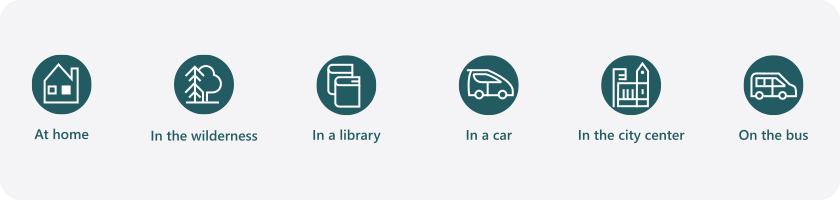
Support Card | Physical Context
Different environments enable different capabilities, present different limitations, and have different rules and social norms. Here are a few examples for inspiration:
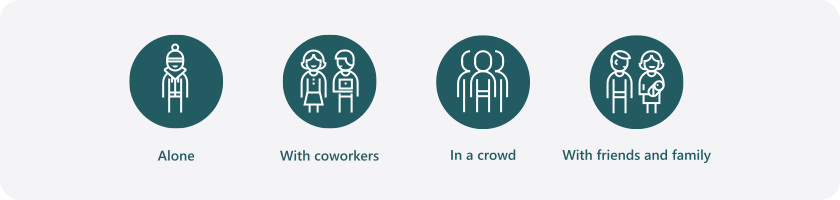
Support Card | Social Context
Different social contexts come with different rules, behaviors, and social norms. Here are some examples of social contexts for inspiration:
Support Card | Temporary/Situational Limit
Disabilities are often temporary or situational. Use this card to pick which limitations apply to your scenario.

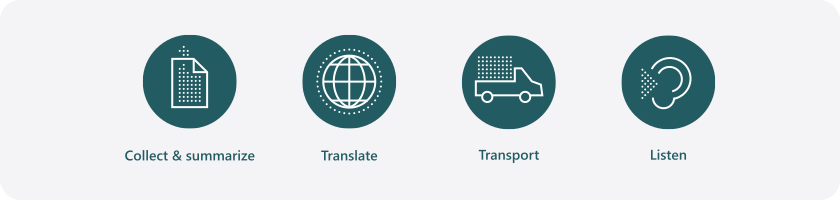
Support Card | Role of Technology
Most digital products have one or two roles that are at the core of their functionality. Some examples of common roles are:
Support Card | Examples of Mismatch
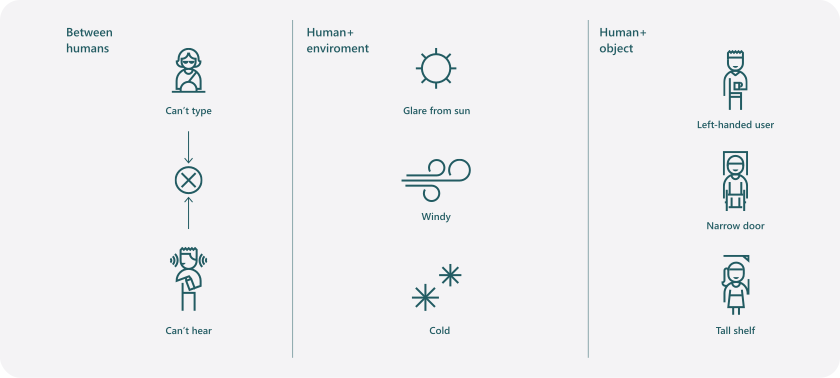
Exclusion can be caused by mismatched interactions between other humans, humans and their environments, and humans and objects. A few examples of these are:
Support Card | Conditions
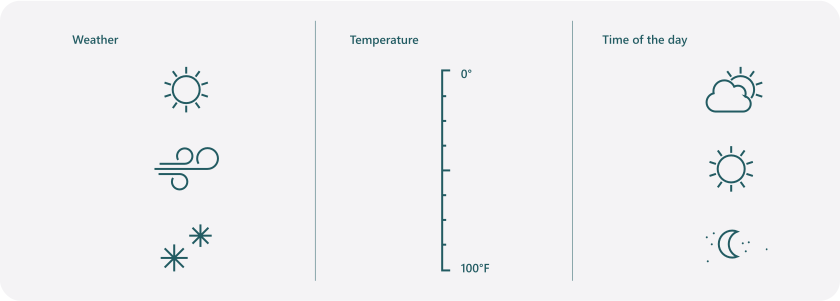
Different environmental conditions can change our situational limitations. Here are some examples of conditions to consider.
Support Card | The Persona Spectrum
We use a Persona Spectrum to understand related limitations across a spectrum of permanent, temporary, and situational disabilities. It’s a quick tool to help foster empathy and to show how a solution can scale to a broader audience.